
If your HVAC is eating up 27% to 50% of your building’s energy, waiting for a monthly bill is too late. I’d sum it up like this: real-time monitoring helps you spot wasted runtime, comfort drift, air quality issues, and unit trouble while it’s happening so you can fix problems before they turn into higher bills, tenant complaints, or a repair that costs 3 to 5 times more than planned service.
Here’s the short version:
- I can track temperature, humidity, pressure, airflow, runtime, and energy use live
- I can catch issues like after-hours runtime, short cycling, and heating and cooling at the same time
- I can use alerts and dashboards to cut fault response from 24–72 hours to under 5 minutes
- I can start with a small pilot, watch before-and-after results, and then expand
- I need both good sensor data and a team that knows how to act on it
For many businesses, the biggest HVAC problems are simple:
- Energy waste that stays hidden until the bill arrives
- Breakdowns that happen between service visits
- Rooms that are too hot, too cold, or too humid
- Poor visibility across more than one building
Real-time monitoring addresses those issues by giving me a live view of system behavior instead of forcing me to guess from complaints or invoices. That matters even more in places like Chicagoland, where summer humidity and winter cold can put extra strain on comfort and energy use.
A simple rollout usually looks like this:
- Review units, mechanical contracting controls, and network coverage
- Pick a few high-impact systems first
- Install basic sensors and tune alerts
- Compare energy, comfort, IAQ, and service calls before and after
- Use the data to guide service and control changes
The main point is simple: real-time HVAC monitoring gives businesses faster warning, lower waste, fewer surprise repairs, and better control over comfort and indoor air.
Abound™ HVAC Performance: Real-Time Connectivity & Continuous Monitoring for Optimal Comfort Carrier
sbb-itb-b5c10b1
Common HVAC Problems Businesses Face
Most businesses don’t spot HVAC trouble right away. They notice it when the electric bill jumps, people start complaining, or repair costs stack up. At that point, the damage is already done.
High Energy Bills and Wasted Runtime
One of the biggest drains on a commercial energy budget is HVAC running when nobody needs it. After-hours operation can still hit 40% to 50% of peak-period energy levels because of bad schedules or manual overrides. In plain English, systems start too early, shut off too late, or just keep running after everyone has gone home.
Another common issue is simultaneous heating and cooling. That happens when one zone is heating while another is cooling, often because of stuck dampers or sensor drift. It sounds wasteful because it is. This fault usually makes up 15% to 30% of total HVAC energy waste.
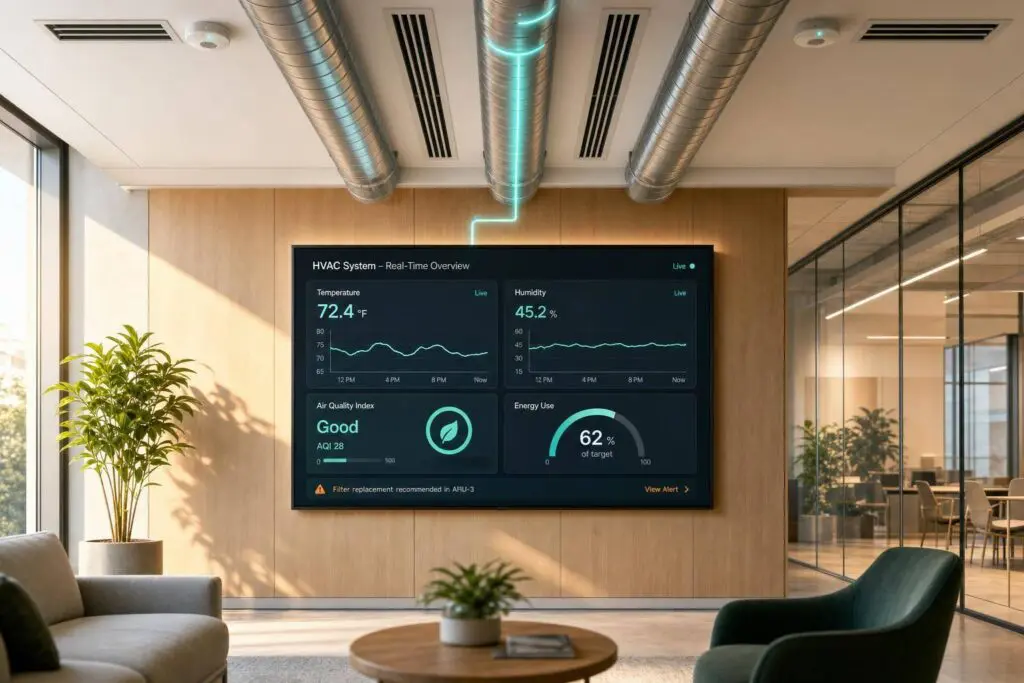
These losses are easy to miss if you’re only looking at monthly utility bills. Live dashboards make the problem much easier to spot before the bill arrives.
Breakdowns, Comfort Complaints, and IAQ Gaps
The same lack of visibility also slows down repairs and hides comfort problems. Reactive maintenance misses a lot because most failures don’t wait for the next scheduled visit. In fact, 87% of HVAC equipment failures develop and complete between scheduled quarterly maintenance visits. A leak or compressor issue can sit there quietly until it turns into a bigger, more expensive problem.
Comfort issues often follow the same pattern. A zone stuck at 78°F when the setpoint is 72°F, or short-cycling that causes constant temperature swings, is hard to pin down without live data. The problem isn’t always heat or cooling alone, either. Ventilation and humidity matter too, and when those drift out of range, people feel it.
Ventilation failures and humidity issues can reduce worker cognitive performance by 5% to 15%. That’s a business cost that often slips past a maintenance log. Live temperature, humidity, and airflow data help teams narrow down the source much faster.
Reactive Maintenance and Limited Multi-Site Visibility
This gets even harder when one team is responsible for several buildings. Quarterly maintenance gives a technician only about 4 hours of attention per year. That’s not much time for rooftop units, split systems, and boilers spread across multiple sites.
Without one shared view, teams often depend on whoever happens to notice something first. Usually, that’s an occupant. And usually, it happens after comfort has already slipped. Across multiple locations, real-time monitoring gives teams one view of every system instead of forcing them to piece the story together building by building.
These are the kinds of problems real-time monitoring is built to surface.
How Real-Time Monitoring Addresses These Problems
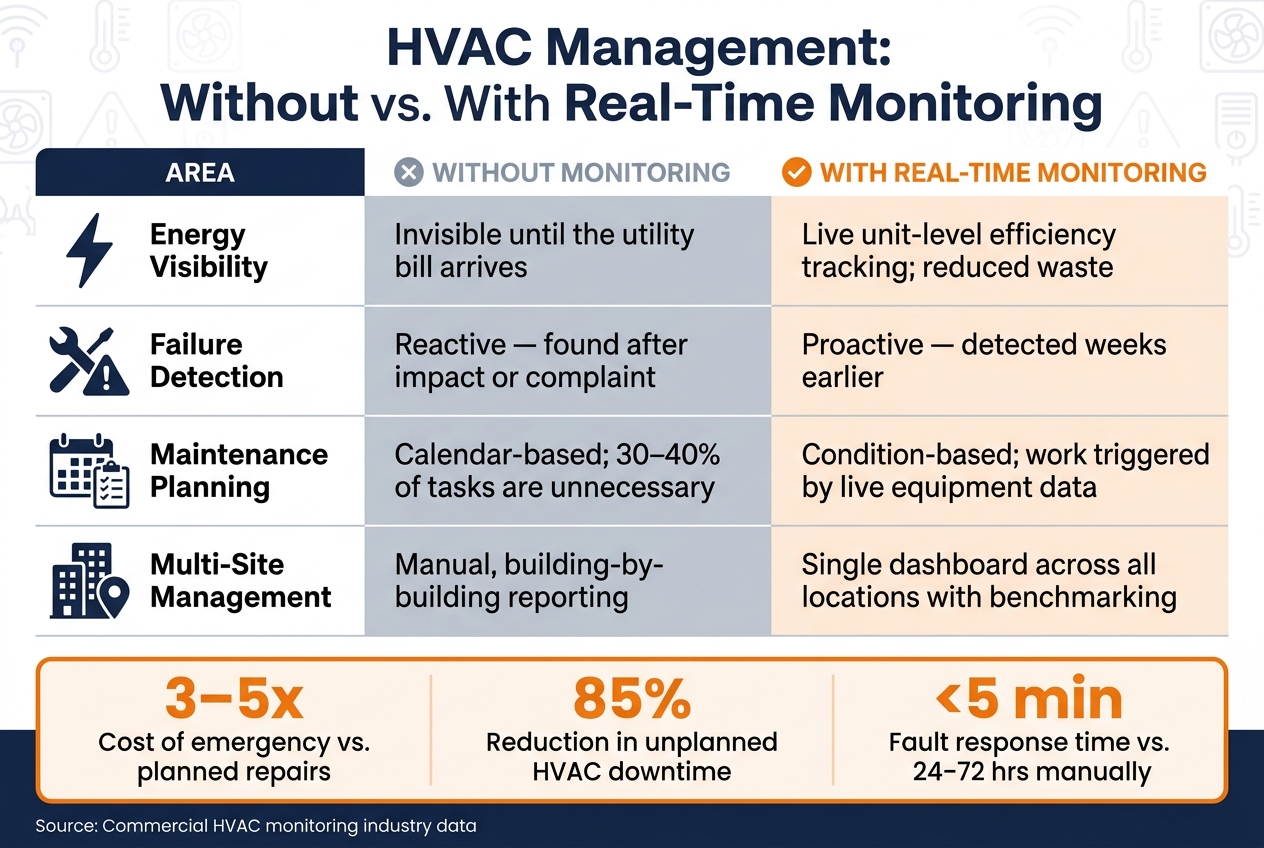
HVAC Management: Without vs. With Real-Time Monitoring
Sensors, Dashboards, and Alerts That Catch Problems Early
Real-time monitoring puts sensors on key HVAC components and streams live data to a cloud dashboard. That live feed helps teams spot trouble early instead of finding out after a complaint, a breakdown, or a high utility bill.
The system watches temperature, vibration, electrical load, pressure, and IAQ. Those readings can point to short cycling, airflow issues, and equipment wear before they turn into bigger problems.
That means hidden issues become clear next steps.
Sensors usually focus on the parts most likely to fail:
- Temperature sensors track supply and return air delta-T, plus refrigerant line temperatures, to flag coil freeze, low efficiency, or charge loss
- Vibration sensors mounted on compressors and fan motors can spot bearing wear, shaft imbalance, and belt wear weeks before a mechanical failure
- Current transformers (CTs) clamp onto motor leads to show overload, electrical wear, or a locked rotor
- Differential pressure sensors track filter loading and duct static pressure to help manage airflow balance
- CO2/IAQ sensors support demand-controlled ventilation and confirm that ventilation stays in range
Cloud dashboards give facilities teams one place to check asset health, operating status, unit-level energy use, and past trends. When a reading moves out of range, the system sends an alert before the issue gets worse. A compressor that starts short-cycling, a unit with too much runtime, or a slow climb in head pressure can all trigger priority alerts. Response times for critical faults drop from 24–72 hours with manual checks to under 5 minutes with automated alerts.
HVAC Management Without Monitoring vs. With Real-Time Monitoring
The gap shows up fast in day-to-day work.
Here’s what changes when a business adds real-time monitoring:
| Area | Without Monitoring | With Real-Time Monitoring |
|---|---|---|
| Energy visibility | Invisible until the utility bill arrives | Live unit-level efficiency tracking; reduced waste |
| Failure detection | Reactive; found after impact or complaint | Proactive; detected weeks earlier |
| Maintenance planning | Calendar-based; 30–40% of tasks are unnecessary, but using an HVAC maintenance checklist generator can help streamline planning | Condition-based; work triggered by live equipment data |
| Multi-site management | Manual, building-by-building reporting | Single dashboard across all locations with benchmarking |
This change is not just about smoother operations. It also hits the budget. Emergency repair callouts usually cost 3–5 times more than planned maintenance, and continuous monitoring can cut unplanned HVAC downtime by 85%. If you’re running several properties, those savings don’t stay small for long.
Once the monitoring points are mapped out, the next move is choosing which systems to connect first.
How to Set Up Real-Time HVAC Monitoring in a Commercial Building
Review Your Equipment, Controls, and Business Goals
Before you buy a single sensor, walk the building and see what you already have. Start with the systems most tied to high utility costs, breakdowns, or tenant complaints. Make a list of each key asset – RTUs, split systems, boilers, and chillers – and note whether each one supports BACnet or Modbus, or if it needs added wireless sensors.
A lot of commercial HVAC equipment already uses BACnet or Modbus. That means you can often connect it through a gateway instead of replacing hardware. If sensors are missing, wireless IoT devices can often be added in 15–30 minutes per unit, with no rewiring needed.
You’ll also want to check network coverage at every equipment location. Concrete and steel can weaken wireless signals, so a sensor that looks fine on paper may struggle once it’s on the roof or tucked inside a mechanical room.
Set clear targets early. Skip broad goals like “improve performance” and use numbers instead. For example:
- Reduce kWh use by 15%
- Cut emergency service dispatches by 50%
- Maintain 95% HVAC uptime
Once you’ve mapped your equipment and network, pick the units with the biggest upside for your first pilot.
Roll Out in Phases and Track Before-and-After Results
Start small. Choose five high-impact units – the ones behind the most service calls or the ones serving your most mission-critical spaces – and run a 4–8 week pilot before going bigger.
Begin with a simple sensor package: temperature and current sensors first. Then, as the system starts proving itself, add vibration and pressure probes. That approach keeps the setup easier to manage and gives your team time to get used to the data.
For the first two weeks, keep your normal HVAC services and maintenance rounds in place while the new system runs in parallel. Use that window to tune alert thresholds so they match how the equipment actually behaves. That step matters. If alerts fire all day for no good reason, people stop paying attention fast.
Record 30 days of pre-monitoring data for energy use, comfort, and IAQ, then set targets for kWh use, emergency calls, and uptime. After that, compare pre- and post-pilot results against your baseline, including:
- Energy use
- Comfort complaints
- Emergency calls
- IAQ readings
That pilot data shows you where to expand next and which alert thresholds still need work.
Work With a Qualified Local HVAC Team
Data helps only if someone knows what to do with it. Technicians and facility managers need to read alerts, spot what matters, and act before a small issue turns into a shutdown. Without trained staff, false alarms stack up and actual faults get missed.
Once the pilot is stable, a local HVAC team can help turn the data into maintenance tasks and control changes. A qualified Chicagoland HVAC team such as Eco Temp HVAC can help install, calibrate, and maintain the monitoring setup.
Conclusion: What Businesses Gain From Real-Time HVAC Monitoring
Put it all together, and HVAC data gives teams a way to act sooner and cut operating risk. Commercial HVAC systems make up 27% to 50% of a building’s energy use. With real-time monitoring, facility teams can spot faults early, before they turn into expensive breakdowns.
Instead of waiting for something to fail, teams get early warnings, can respond faster, and avoid costly surprises.
That leads to less waste, fewer emergency repairs, lower maintenance costs, better comfort, and stronger indoor air quality.
But alerts only help if people use them. The best approach is usually phased: audit equipment, set targets, test high-impact assets first, and train staff to respond to alerts. For Chicagoland businesses, Eco Temp HVAC can help install and support commercial monitoring systems so your team can act on data faster.
FAQs
How much can real-time HVAC monitoring save?
Real-time HVAC monitoring can cut costs in a big way for businesses. Energy use can drop by 15% to 40%, and maintenance costs often fall by 30% to 40%.
It also helps teams spot problems early, like fouled coils or airflow restrictions, before they turn into bigger headaches. That means fewer emergency callouts, which can cost 3 to 5 times more than planned service. In many cases, businesses see full ROI within 12 to 24 months.
What HVAC systems can be monitored in real time?
Real-time monitoring works with almost any HVAC equipment that produces measurable operating data.
Common examples include rooftop units, air handling units, chillers, boilers, cooling towers, heat pumps, split systems, ductless mini-splits, and CRAC units. It also applies to key parts like compressors, fans, pumps, exhaust fans, and VAV boxes.
With 24/7 visibility, these systems track data points such as temperature, pressure, vibration, motor current, and energy use.
How do I start a small monitoring pilot?
Start with a walk-through of the facility and pinpoint the equipment that matters most if it goes down, such as chillers or air handling units. The goal is simple: figure out which failures would hurt operations the most.
Then look at your current Building Management System and check what data is already available before you install anything new. In many cases, you may already have part of the picture.
From there, pick a small group of wireless IoT sensors to monitor key signals like temperature, vibration, and motor current. After setup, run a 30-day burn-in period to calibrate thresholds and tune alerts so they fit normal operating conditions.