
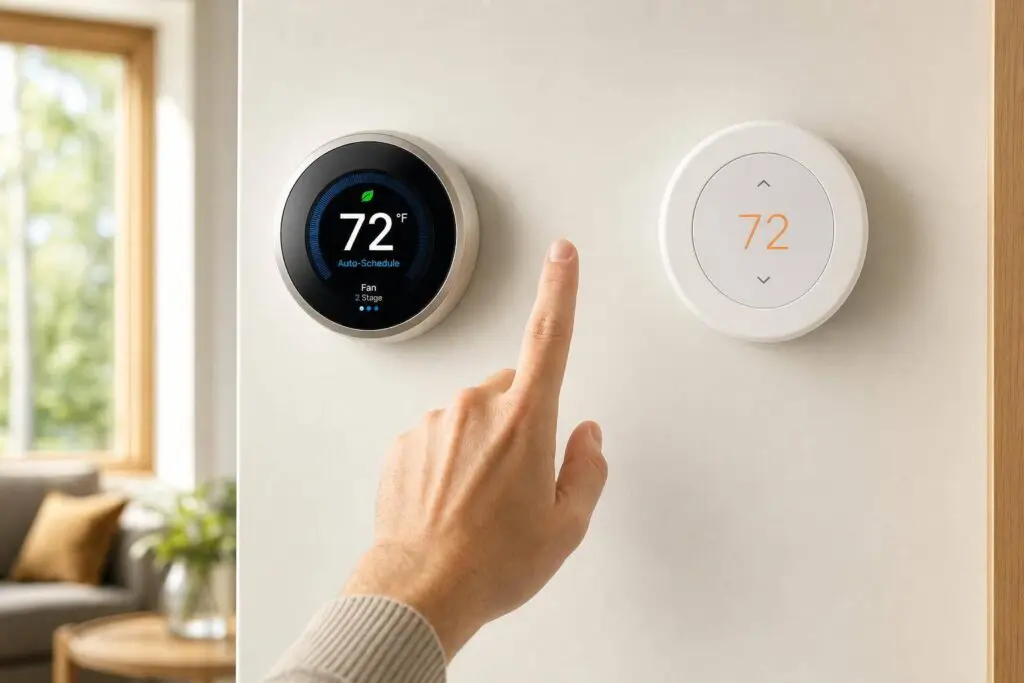
If I want more automation, room-based control, and support for more HVAC setups, I’d pick the Nest Learning Thermostat (4th Gen). If I want the lower price and don’t mind setting schedules myself, I’d pick the Nest Thermostat.
Here’s the whole comparison in plain English:
- Price: Nest Learning Thermostat is about $279.99; Nest Thermostat is about $129.99
- Sensors: both have built-in motion, temperature, humidity, and light sensors
- Room control: only the Learning Thermostat works with Nest Temperature Sensors, and it includes 1 sensor
- Scheduling: the Learning Thermostat can learn my routine; the Nest Thermostat uses manual schedules
- Home/Away: both can switch to Eco Temperatures when nobody is home
- Voice control: both work with Google Assistant and Amazon Alexa; the Learning model also works with Apple Home/Siri through Matter
- App control: both use the Google Home app
- HVAC support: both work with about 85% of 24V systems, but the Learning model supports more complex systems
- Stages: Learning supports up to 3 heating / 2 cooling stages; the standard model is for simpler setups
- Extra HVAC terminals: the Learning model supports humidifier, dehumidifier, and ventilation connections
- Energy savings: Nest says average savings can be around 10%–12% on heating and 15% on cooling for the Learning model
If I boil it down even more:
- Choose Nest Learning Thermostat for:
- multi-stage systems
- hot/cold rooms
- less manual setup
- sensor-based room focus
- Choose Nest Thermostat for:
- smaller budgets
- simple furnace + AC setups
- renters or smaller homes
- people who are fine using the app to manage schedules
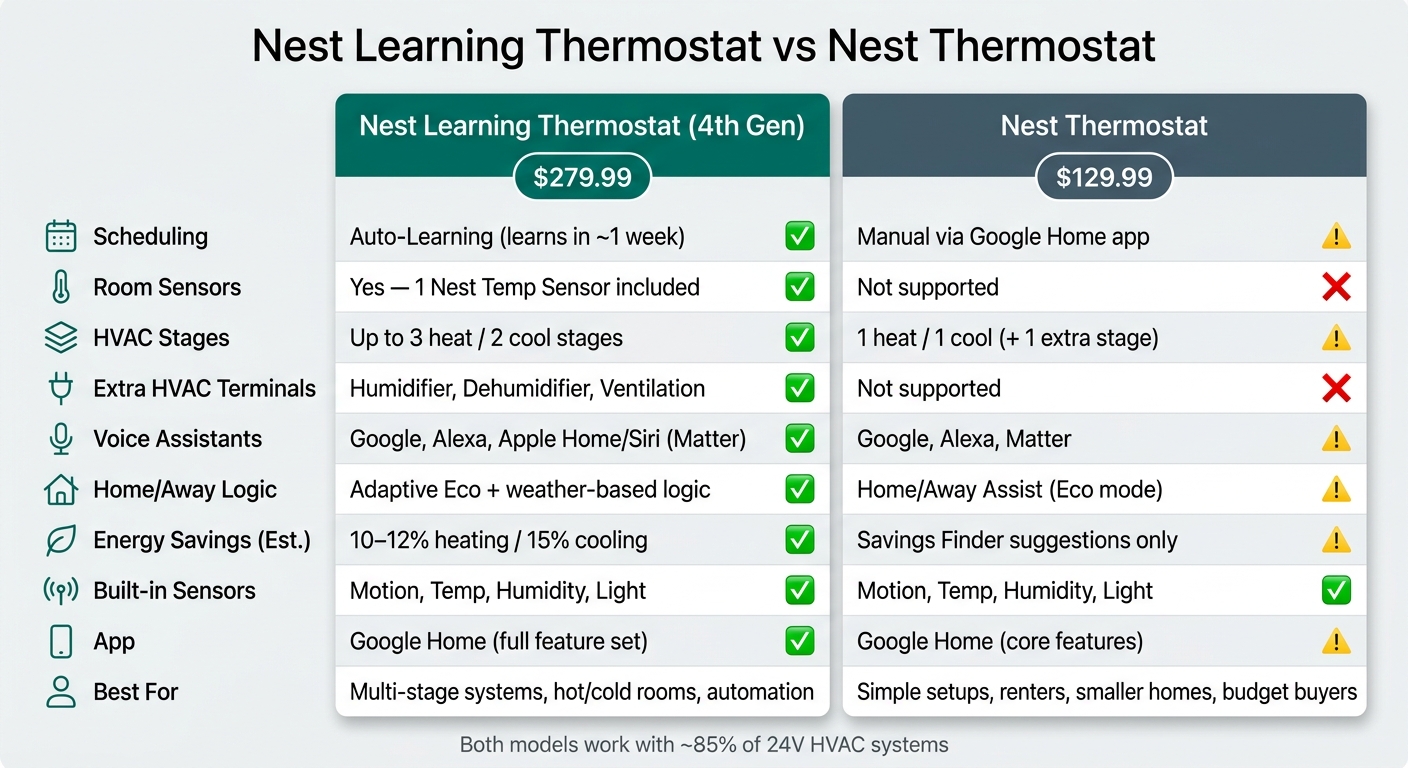
Nest Learning Thermostat vs Nest Thermostat: Full Feature Comparison
The NEW Nest Thermostat Vs Nest Learning Thermostat!
Quick Comparison
| Feature | Nest Learning Thermostat (4th Gen) | Nest Thermostat |
|---|---|---|
| Price | $279.99 | $129.99 |
| Built-in sensors | Motion, temp, humidity, light | Motion, temp, humidity, light |
| External room sensor support | Yes | No |
| Sensor included | Yes, 1 | No |
| Scheduling | Learns schedule | Manual |
| Home/Away | Eco + weather-based logic | Eco with Home/Away Assist |
| Voice | Google, Alexa, Apple Home/Siri via Matter | Google, Alexa |
| App | Google Home | Google Home |
| HVAC support | More system types | Simpler system types |
| Stages | Up to 3 heat / 2 cool | Lower-stage support |
| Humidifier / dehumidifier / ventilation | Yes | No |
Bottom line: the Learning model is the better fit for comfort control and more involved HVAC systems. The standard Nest Thermostat is the lower-cost pick for basic smart temperature control.
Nest Learning Thermostat Features
The Nest Learning Thermostat (4th Gen) does more of the work for you than the Nest Thermostat. It leans harder into automation, needs less hands-on scheduling, and supports more HVAC setups.
Sensors and Room Prioritization
The 4th Gen model comes with built-in motion, temperature, humidity, and light sensors. It also uses those sensors along with your phone’s location to tell when nobody’s home. When that happens, it can switch to Eco Temperatures, which can help cut energy use while the house is empty.
It also works with external Nest Temperature Sensors (2nd Gen) – and one is included. You can put that sensor in a room that matters more at certain times, like a home office, nursery, or a room that always feels too warm or too cold. Instead of relying only on the temperature near the thermostat, it can focus on that room based on the time of day.
That same hands-off approach shows up in how it handles scheduling too.
Auto-Learning Schedules and Energy Tools
The thermostat can learn your routine on its own and build a schedule automatically. It also includes Adaptive Eco, which uses weather-based logic to cut system runtime when possible. On top of that, it sends maintenance alerts, like reminders to change your air filter and warnings about unusual system behavior.
Independent studies show average savings of 10% to 12% on heating and 15% on cooling.
It also connects with more smart home platforms and supports more HVAC gear.
Voice Control, App Access, and HVAC Compatibility
The Learning Thermostat is Matter-compatible and works with Apple Home, Amazon Alexa, and Google Home. It supports up to 3 stages of heating and 2 stages of cooling, plus humidifier, dehumidifier, and ventilation terminals.
As Google Nest Support says:
"The Nest Learning Thermostat is designed to work in most homes without a common (C) wire."
So, in many homes, it can work without a C-wire.
Next, compare those extras with the simpler Nest Thermostat.
sbb-itb-b5c10b1
Nest Thermostat Features
The standard model sticks to the basics, but it drops the automation and room-specific control you get with the Learning Thermostat. It costs $129.99 and keeps the main smart features, just without auto-learning.
Built-In Sensors and Key Limits
You still get built-in motion, temperature, humidity, and light sensors, along with Home/Away Assist. But there’s one big catch: it does not work with external Nest Temperature Sensors. So instead of letting the system fine-tune comfort by room, you’ll do more of that work yourself through manual scheduling.
Manual Scheduling and Smart Controls
Scheduling is handled manually in the Google Home app. That’s the main tradeoff here.
A couple of smart tools are still included:
- Savings Finder suggests small tweaks that may help cut energy use
- Home/Away Assist can switch the thermostat to Eco Temperatures when nobody’s home
So while it won’t learn your routine on its own, it still gives you a few nudges in the right direction.
Voice Support, App Experience, and System Compatibility
The Nest Thermostat works with Google Assistant and Amazon Alexa, so you can adjust it with voice commands. It also supports Matter. For remote access, though, you’re limited to the Google Home app.
On compatibility, it works with about 85% of 24V systems, including furnaces, central AC, boilers, and heat pumps. Still, if you have a dual-fuel, multi-zone, heat-only, or cool-only setup, it’s smart to run it through Google’s Compatibility Checker first.
Those limits stand out the most when you put this model next to the Learning Thermostat and compare them side by side.
Nest Learning Thermostat vs Nest Thermostat: Side-by-Side Comparison
Sensors, Scheduling, and App Features
The table below shows the differences that matter most.
| Feature | Nest Learning Thermostat (4th Gen) | Nest Thermostat (Standard) |
|---|---|---|
| Sensors | Includes 1 Nest Temperature Sensor (2nd Gen) | Supports external sensors; none included |
| Scheduling | Auto-learning via Smart Schedule | Manual scheduling via Google Home app |
| Home/Away | Adaptive Eco + Home/Aay Assist | Home/Away Assist |
| Voice Support | Google Assistant, Alexa, Siri (via Matter) | Google Assistant, Alexa, Matter |
| App Controls | Google Home app (full feature set) | Google Home app (core features) |
| Energy Tools | Savings Finder, Energy History, Adaptive Eco, System Health Monitor | Savings Finder, HVAC monitoring |
| System Compatibility | Up to 3 heating stages / 2 cooling stages; humidifiers, dehumidifiers, ventilation | 1 heating stage / 1 cooling stage, plus a second stage of either heating or cooling |
The Learning Thermostat’s Adaptive Eco does more than the standard model’s Home/Away Assist. It looks at outdoor weather patterns along with whether anyone is home, which can help cut back or pause HVAC cycles.
Best Fit for Furnaces, Boilers, and AC Systems
If you have a simple single-zone setup, the standard Nest Thermostat usually makes more sense. Think of a furnace with central AC in a small house or apartment. It handles the job well without adding extra layers you may never use.
It works with about 85% of 24V systems, including gas, electric, oil, forced-air, heat pump, and radiant systems.
The Learning Thermostat starts to pull away when the HVAC setup gets more involved. It supports 3 stages of heating and 2 stages of cooling, so it’s a stronger match for multi-stage furnaces, heat pumps with auxiliary heat, or systems that also use a humidifier or dehumidifier.
There’s another big difference here: the Learning Thermostat has dedicated terminals for HUM, DEHUM, and VENT, while the standard model does not. And if some rooms run hot while others stay chilly, the included 2nd Gen Temperature Sensor gives the Learning Thermostat a clear edge.
Budget and Comfort Priorities: Which Model Fits Your Needs
The price difference isn’t small: $129.99 for the standard Nest Thermostat and $279.99 for the Nest Learning Thermostat (4th Gen).
So what are you paying for? Mostly automation.
The Learning Thermostat can learn your routine in about a week, keep an eye on HVAC system health, and bring in outdoor air when conditions allow to ease strain on the system. Estimated energy savings land at about 12% on heating and 15% on cooling.
The standard Nest Thermostat still gives you smart controls and a few useful prompts, but you’ll handle more of the schedule yourself. For renters, smaller homes, or anyone who wants dependable remote control without paying for the top-tier model, the standard Nest Thermostat is a solid pick.
Installation Considerations and Final Takeaway
Why Professional Setup Matters for Smart Thermostats
Once you’ve picked your model, installation is the last piece of the puzzle.
Nest thermostats are pretty DIY-friendly. Google says most simple 24V installations take 40 minutes or less. That said, some HVAC setups are a different ball game. If you’re dealing with boilers, heat pumps with auxiliary heat, zoned systems, or equipment that uses a humidifier or dehumidifier, it’s smarter to bring in a pro.
Google also makes an important point: thermostat alerts do not replace a qualified HVAC diagnosis. In Chicagoland, Eco Temp HVAC handles smart thermostat installation, compatibility checks, and safe wiring for more complex HVAC systems.
Key Points to Remember
The main differences come down to automation, sensor support, and HVAC complexity.
The Nest Learning Thermostat learns your routine in about a week, comes with a Nest Temperature Sensor (2nd Gen), and supports up to 3 heating stages and 2 cooling stages. The standard Nest Thermostat uses manual scheduling and doesn’t include a sensor. It costs $129.99, while the Learning model costs $279.99.
Choose the Nest Learning Thermostat if you want more automation and support for more complex HVAC systems. Choose the Nest Thermostat if you want a lower upfront cost and a simpler setup.
FAQs
Do I need a C-wire?
Most Google Nest thermostats can run without a C-wire thanks to power-sharing.
That said, a C-wire is still the most dependable way to supply steady power. And in some setups – like certain heating-only systems, heat pumps, or more complex zoned systems – you may need one to keep the thermostat running without issues.
If your system doesn’t have a C-wire, you may need a Power Extender Kit or help from a professional.
Can I use it with a zoned HVAC system?
Yes. A Nest thermostat can work with a zoned HVAC system.
The key thing to know is that each zone works on its own. So if your home has more than one zone, you’ll need a separate Nest thermostat for each one.
If you want better temperature readings and tighter control, you can also pair each thermostat with Nest Temperature Sensors.
That said, wiring and setup can get tricky with zoned systems. For that reason, professional installation is recommended.
Is the Learning model worth the extra cost?
It comes down to one thing: do you want a thermostat that handles more on its own, or one that gives you a simpler, lower-cost setup?
The Nest Learning Thermostat makes more sense if you want a hands-off, set-it-and-forget-it experience. It learns your routine, builds schedules for you, includes a temperature sensor, and comes with a more polished design plus extra features.
The standard Nest Thermostat is the better pick if you want to spend less and don’t mind setting and adjusting schedules yourself in the app. It’s still a solid, dependable option.